More traffic will not resolve a broken inquiry path. Test the service page, lawyer information, contact form, notification, and follow-up process so the firm knows where relevant prospects are getting stuck.
Conversion optimization for a law firm is not a contest to produce the highest form-submission rate. The useful outcome is a qualified inquiry that the firm can receive, evaluate and respond to through an approved process. A submission, analytics event, delivered notification, answered call, qualified matter and retained client are different facts.
This guide provides a practical testing method. It is not a completed review of a particular firm, and it does not claim that any change will produce a stated increase in cases or revenue. Start with the full inquiry path, keep dated evidence, and let real qualified-inquiry records guide the next change.
For the wider acquisition system, see law-firm marketing and SEO. For a technical and search review, use the law-firm SEO audit guide.
Define the conversion before changing the page
Write down the action the page is supposed to support. A practice-area page may help a person decide whether the firm handles the issue. A lawyer profile may help the person assess fit. A location page may confirm service coverage. The contact page should make the available next steps and required information clear.
Do not force every page to perform the same task. A person reading an early educational guide may reasonably continue to a service page instead of contacting the firm. A person on a contact page may need to choose between calling, submitting a form or using another approved intake route. The page's job determines what should be measured.
Agree on a short measurement dictionary before interpreting reports. The names should reflect what actually happened.
| Signal | What it establishes | What it does not establish |
|---|---|---|
| Contact link click | A tracked visitor activated the link | The call connected or an inquiry was received |
| Form validation passed | The browser accepted the required inputs | The server stored or delivered the submission |
| Confirmation displayed | The website returned a success state | Staff received, reviewed or answered the inquiry |
| Analytics lead event | The configured event reached the analytics system | The inquiry exists in the firm's intake system |
| Intake record created | The approved system contains an inquiry record | The matter is qualified or accepted |
| Qualified inquiry | The firm applied its recorded qualification definition | The person retained the firm |
| Retained client | The firm recorded a completed engagement step | The original page alone caused the decision |
Google Analytics lists generate_lead as a recommended event for initial lead acquisition such as a form submission. It separately documents events for later lead stages. Use those names only when the implementation matches the event's meaning. Google's recommended-events reference is a naming guide, not proof that the firm's operational process worked.
Map the page-to-intake journey
Draw one line from the visitor's landing page to the first accountable staff action. Include systems and people, not just buttons. A simple web form might pass through browser validation, a form endpoint, spam screening, email or CRM routing, assignment rules and a staff queue. Each handoff can succeed while the next one fails.
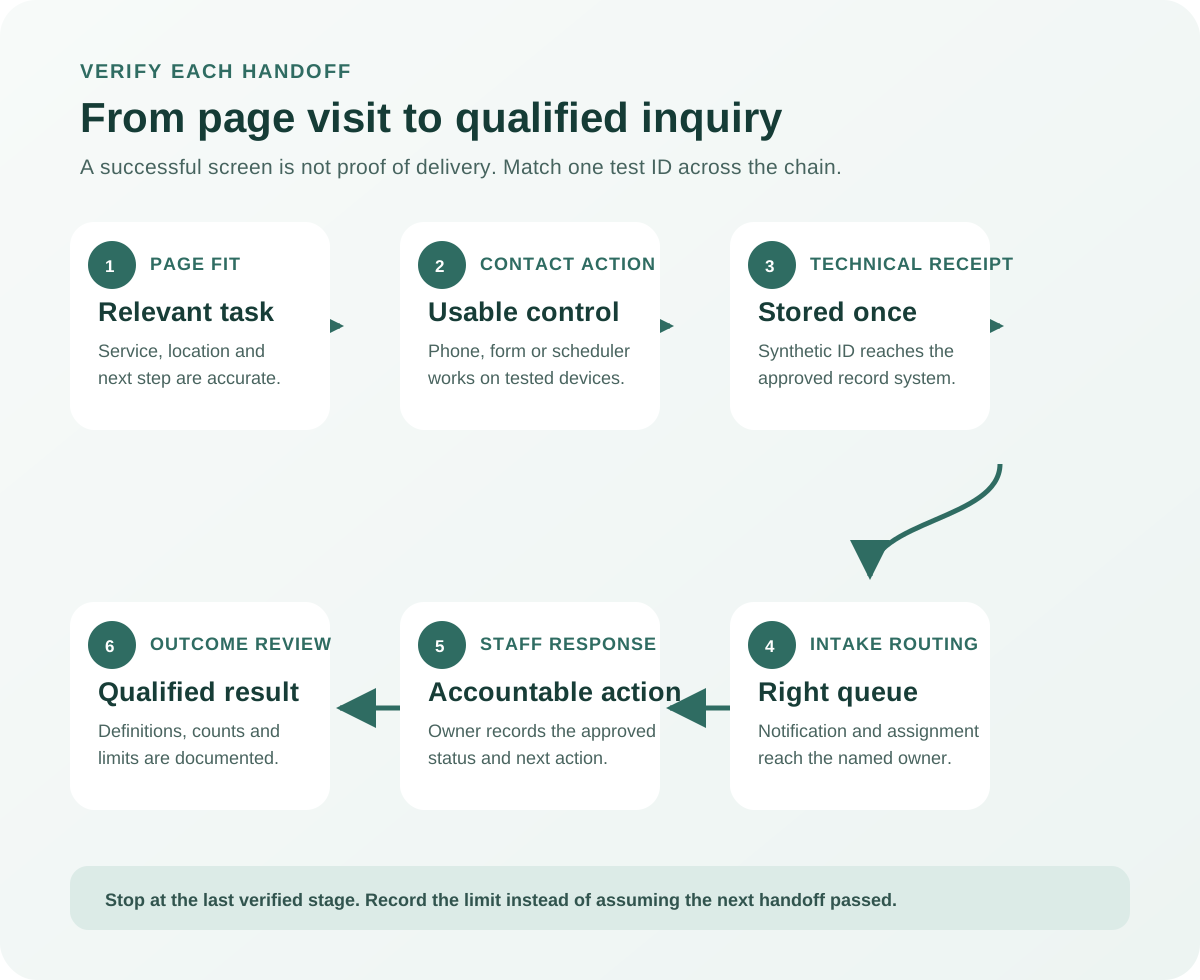
The diagram is a testing sequence, not a claim about the firm's present performance:
- Confirm that the page matches the service and reader task.
- Confirm that the contact option works on the tested device.
- Confirm that a permitted synthetic inquiry receives a technical success response.
- Confirm that the submission reaches the approved intake destination.
- Confirm that ownership and status are visible to the responsible person.
- Review qualified outcomes using the firm's own definitions.
If account access or permission ends at step three, record that limit. Do not mark routing or staff handling as passed simply because a confirmation screen appeared.
Validate the full inquiry chain first
Test the existing path before redesigning it. Otherwise, a form-delivery failure can be misread as a copy or layout problem. Use clearly labelled synthetic details approved by the firm. Never put a real prospective client's facts into a test record.
Run the minimum set of relevant scenarios. That normally includes a phone and desktop viewport, keyboard navigation, required-field errors, a successful permitted submission and the downstream receipt. If the site supports several practice areas or routing choices, test the branches that actually change where the inquiry goes.
| Journey step | Example failure | Evidence to retain | Owner and acceptance test |
|---|---|---|---|
| Service-page fit | Page describes a different service or jurisdiction | URL, visible copy, review date and approved service map | Content owner confirms purpose, then reviewer approves the corrected page |
| Contact action | Phone link or button is hidden, unclear or wrong | Device, viewport, screenshot and destination | Web owner verifies the displayed value and activated destination |
| Form input | Required field is unlabeled or error is hard to locate | Keyboard sequence, field markup and error state | Accessibility owner repeats the task without a pointer device |
| Submission | Browser shows success but endpoint rejects the record | Test ID, timestamp, response and server or form log | Technical owner matches one synthetic test to one stored receipt |
| Notification | Intake record exists but alert goes nowhere | Test ID, destination, routing rule and delivery evidence | Intake owner sees the record in the approved queue |
| Assignment | Inquiry has no responsible person or status | Test ID, queue state and assignment history | Named owner accepts and updates the test record |
| Measurement | Event fires on a button click before a successful result | Debug trace, trigger rule and expected event definition | Analyst observes the event only after the defined success state |
For Google-tag implementations, Tag Assistant can help verify and troubleshoot tags. GA4 DebugView displays events collected from a debug-enabled device. These tools test instrumentation. Match the event to a separate intake receipt before calling the operational chain complete.
Do not leave synthetic records mixed with production reporting. Label and remove or exclude them according to the firm's approved data process. Record what was done so later reports are not interpreted as real demand.
Give every page one primary client task
Review the pages that receive relevant traffic or support important services. For each page, state the primary task in one sentence and list the evidence a person would need to complete it. This avoids adding calls to action before the page answers the reason someone arrived.
A practice page may need:
- a plain-language description of the matter the firm handles;
- genuine jurisdiction and service boundaries;
- lawyer or team information the firm has approved;
- a clear next step and an alternative route where appropriate;
- current contact details and availability wording; and
- links to related information without creating a second competing path.
Do not invent urgency, office locations, outcomes, credentials or availability. If the firm cannot accept a matter type or jurisdiction, a higher inquiry count from that audience is not an improvement.
Use internal links to move readers between distinct tasks. The law-firm website design guide covers page specifications, ownership and launch acceptance. The contact page is the live destination for starting a conversation with SWM.
Make contact choices clear and forms recoverable
The page should explain what action is available and what will happen next using wording the firm has approved. Keep phone numbers consistent, make interactive elements recognizable, and avoid placing the only contact route inside a fragile script or visual effect. On small screens, confirm that fixed headers, chat controls and consent banners do not cover the action.
Use visible labels for form controls. W3C's form-label guidance explains how labels identify controls for users and assistive technology. Placeholder text can supplement a label, but it should not be the only identification for a field.
Errors need to identify the affected field, explain how to correct it and remain available to keyboard and screen-reader users. W3C's form-validation guidance describes accessible error notification. Test invalid and corrected submissions instead of checking only the happy path.
Ask only for information that the approved intake process needs at that stage. For Canadian organizations subject to PIPEDA, the Office of the Privacy Commissioner says collection must be limited to what is needed for identified purposes and protected with safeguards appropriate to sensitivity. Review the regulator's fair-information principles and have the firm's lawyer or privacy lead approve the actual fields, notices, providers, retention and disclosures. A generic marketing checklist cannot determine which law applies to a particular firm.
Avoid asking a prospective client to place detailed confidential facts into an open marketing form unless the firm has deliberately approved that collection and its safeguards. Clear instructions can direct the person to the appropriate channel without making promises about representation or confidentiality that the firm has not reviewed.
Connect notifications, ownership and follow-up
A website handoff is complete only when the approved intake destination receives the inquiry. Document the destination for each route: phone system, shared inbox, CRM queue, scheduler or another controlled system. Then document who owns the first review, the backup path and the statuses staff are expected to use.
Test these handoffs without changing live ownership rules casually. A form can send duplicate alerts, a CRM can reject a record, an inbox can filter a message, and an assignment rule can point to an inactive user. The useful evidence is a timestamped test ID traced through every permitted system.
Do not publish a promised response time unless the firm has approved it and can consistently meet it. Instead, measure the real interval between receipt and the first accountable action using the firm's own records. Separate business hours, after-hours coverage, spam, duplicate inquiries and matters outside the firm's scope where those differences affect interpretation.
| Handoff | Evidence of success | Useful failure label | Verification after a fix |
|---|---|---|---|
| Form to storage | One synthetic ID appears once in the approved record system | Rejected, duplicated or incomplete | Submit a new labelled test and match the stored fields |
| Storage to notification | Alert references the same synthetic ID and intended queue | Missing, delayed or misrouted | Confirm delivery to the approved destination |
| Queue to owner | Responsible person and status are visible | Unassigned or inaccessible | Named owner acknowledges the test record |
| Owner to next action | Approved status and timestamp are recorded | No action, unclear status or wrong branch | Intake lead verifies the expected workflow |
| Reporting to decision | Test records and spam are distinguishable from qualified inquiries | Mixed populations or undefined outcome | Analyst reconciles a stated window to source records |
The goal is not to expose private intake data in a marketing report. Aggregate only what the firm has approved, restrict access, and keep identifiable matter details out of screenshots and shared optimization documents.
Measure qualified outcomes without inventing certainty
Raw conversion rate is calculated as recorded conversions divided by the defined eligible sessions or users for a stated period. The arithmetic is simple. The definitions are not. A number changes when the event, attribution rule, consent state, bot filtering, time window or traffic source changes.
Record at least:
- the page or page group;
- source and campaign where available;
- device category;
- the event definition and trigger;
- reporting dates and attribution setting;
- total recorded inquiries;
- spam, tests and duplicates;
- the firm's qualification definition; and
- the count with an unknown or unresolved outcome.
Do not assign a generic dollar value to every form submission. Google's generate_lead event supports optional value and currency parameters, but an implementation should use them only when the value is real, consistently defined and approved. A placeholder amount can make reports look precise while distorting bidding and budget decisions.
Core Web Vitals can identify user-experience conditions such as loading, responsiveness and visual stability. Google's Web Vitals documentation defines LCP, INP and CLS. Treat them as technical evidence, not a direct measure of retained clients. A faster page can still describe the wrong service, and a qualified inquiry can still arrive from a page that needs performance work.
Prioritize one test with an acceptance rule
Turn findings into a short action register. Each row should include the observed fact, affected page or system, evidence, limit, owner, approved action and acceptance test. Fix broken delivery, inaccessible controls and inaccurate information before debating minor design preferences.
For an optimization test, write the hypothesis before making the change:
- Observed fact: what happened, where, when and on which device.
- Proposed cause: the explanation being tested, clearly labelled as an assessment.
- Change: one controlled difference that addresses the assessment.
- Primary measure: the event or qualified outcome expected to change.
- Guardrail: an outcome that must not degrade, such as form completion errors or qualified-inquiry share.
- Window and segment: the dates, included traffic and exclusions.
- Decision rule: the evidence required to keep, revise or reverse the change.
Use the blank conversion-path worksheet to record the journey without prefilled results. It contains no client data, benchmark rates or revenue estimates.
Small samples and mixed traffic can make percentage changes unstable. Report the counts beside the rate, preserve the comparison window and state material changes in traffic source or page purpose. If there is not enough evidence for a reliable conclusion, say that the result is inconclusive and keep collecting approved observations.
A practical review sequence
Start with the system that already exists:
- Define the page task, conversion event and qualified-inquiry rule.
- Reconcile visible contact details and destinations.
- Run an approved synthetic test through the full intake chain.
- Verify labels, errors, keyboard use and small-screen access.
- Reconcile analytics events with operational receipts.
- Map the pages and traffic segments that support the same service.
- Fix confirmed failures with named owners and acceptance tests.
- Test one material change against qualified outcomes and guardrails.
This sequence does not guarantee a higher conversion rate. It prevents the team from treating a button click as a case, an analytics event as a received inquiry, or a design opinion as measured evidence. The output should be a shorter list of verified failures and accountable fixes, not a longer list of generic best practices.
Sources and limits
This framework was reviewed on October 23, 2026 against:
- Google Analytics recommended events;
- Google Analytics DebugView;
- Google Tag Assistant;
- W3C form labels and form validation;
- Google Web Vitals; and
- the Office of the Privacy Commissioner of Canada's PIPEDA fair-information principles.
Product interfaces, measurement behaviour and applicable privacy or professional rules can change. Confirm current technical documentation and obtain the firm's own legal, privacy and professional-responsibility review for its intake language and process. The examples above are hypothetical workflow examples, not SWM client findings or measured performance claims.