A website migration is complete when the new site works, important old addresses have the intended result, email is intact, and inquiries reach the right people. A copied homepage establishes only a small part of that outcome.
Start by identifying what is changing. A same-domain hosting move is different from a redesign that changes URLs. A domain move introduces additional requirements. Keep the plan specific to the actual transition.
This checklist is for the public marketing website. A client portal or practice-management application needs its own migration plan for access, records, integrations, and recovery.
Define the move and assign owners
| Type of change | Primary dependency | What to preserve or plan |
|---|---|---|
| Hosting changes; URLs stay the same | DNS and operating environment | Pages, assets, mail records, forms, certificates |
| Redesign changes paths | Page mapping and publishing | Relevant redirects, content, canonicals, internal links |
| Domain changes | Destination and domain transition | Domain access, redirects, property verification, relevant platform updates |
| Intake system changes | Record routing and access | Forms, notifications, integrations, retention, live submissions |
Name the person handling deployment, DNS, content approval, intake verification, and the launch decision. Identify who can authorize rollback and how they can be reached.
Use Google's separate guidance for hosting changes without URL changes and site moves with URL changes. Apply the relevant process instead of treating every move as a domain migration.
Inventory the current site before copying it
Collect pages, documents, images, redirects, forms, schedulers, scripts, DNS records, and account access. Use the sitemap, a crawl, Search Console, analytics, and available logs to identify important URLs. A navigation menu alone is not a complete inventory.
Prioritize addresses associated with relevant search traffic, external links, inquiries, and useful downloadable resources. Record the current result and planned destination.
Also identify where live data is created. A website database, form platform, booking tool, and CRM can hold different records. Copying website files does not copy every related system.
Create the URL map
| Old item | Planned treatment | Validation |
|---|---|---|
| Service page retained | Keep its address where practical | Correct content and successful response |
| Page moved | Permanent redirect to the relevant replacement | Direct path to the intended destination |
| Closely overlapping pages combined | Redirect to the page that covers their task | Relevant content preserved |
| Removed page with no suitable replacement | Appropriate missing-page response | Useful site navigation and no unrelated redirect |
| PDF or image moved | Preserve or redirect the asset address where supported | File opens and linked references work |
Avoid sending every removed page to the homepage. Redirects need a relevant destination. Check important existing redirects too; a move can create unnecessary chains when old rules are copied without review.
Google identifies 301 and 308 as permanent redirects. Its site-move guidance recommends retaining migration redirects for at least a year and notes that significant changes can produce temporary search fluctuations. Google's redirect documentation.
Preserve email and domain verification
Record DNS before making changes. Identify website records, MX records, sending-authentication records, and verification records used by other services. Determine whether nameservers are changing or only web records.
Website hosting and business email may use separate providers. If email is staying put, preserve its required records. Confirm who owns any sending service used by contact forms and notifications.
Test ordinary email and website delivery after cutover. A successful web request does not verify the firm's mailbox or sending configuration.
Prepare a representative test environment
The new environment should let the team test the actual page structure and important integrations. Protect private staging content from public access and ensure staging search controls will not be shipped to production.
Verify representative practice pages, biographies, contact, downloads, navigation, metadata, and canonical addresses. Test on a phone and with keyboard navigation. Confirm the editing process that staff will use after launch.
For performance, diagnose relevant pages and tasks rather than testing only the homepage. Our law firm website design service describes useful acceptance criteria.
Plan for submissions created during the transition
A site copy taken on Monday can omit information created before a Wednesday launch. Decide which system is authoritative, whether a publishing freeze is needed, and how newer records will be preserved.
For forms stored outside the website, document the integration and credentials rather than assuming a database copy will restore it. For a website database, confirm any final synchronization and its rollback implications.
Do not overwrite production data with an older staging copy after launch. A rollback should preserve new inquiries and content changes rather than treating the website as a disposable folder.
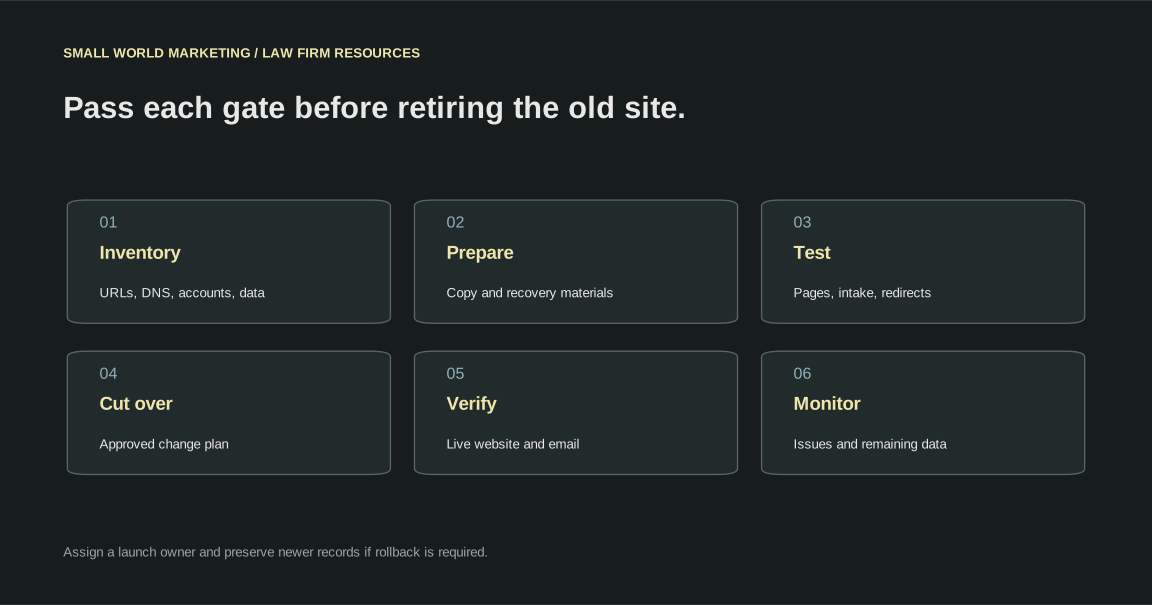
Use launch gates instead of a calendar promise
| Gate | Required evidence | Owner |
|---|---|---|
| Inventory | Important URLs, accounts, DNS, and data paths recorded | Project lead with firm contacts |
| Preparation | New environment and recovery materials available | Technical lead |
| Acceptance | Pages, links, forms, editing, and planned redirects tested | Technical and firm reviewers |
| Cutover | Approved change plan and rollback decision | Launch owner |
| Live verification | Website, mail, intake, and search controls checked | Technical lead and intake contact |
| Monitoring | Issues, traffic, responses, and submissions reviewed | Ongoing care owner |
Download the migration launch checklist and assign the actual people before launch. A date belongs beside work that is ready, not in place of evidence.
Verify the live site before retiring the old environment
Check certificate validity, key pages, old URL results, sitemap, canonicals, robots instructions, and accidental noindex. Confirm the site's intended production hostname and relevant Search Console access.
Test intake using fictional information and verify receipt. Check phone and scheduler links. Distinguish test events from real conversion reporting.
Keep the previous environment available while the transition is being checked. Its remaining records and recovery role need to be resolved before cancellation. Our hosting buyer's guide explains backups and exit arrangements.
Monitor specific failures after launch
Review unexpected missing-page responses, redirect chains, indexing warnings, delivery failures, and unusual inquiry changes. Compare like periods while recognizing that search data can lag and rankings can fluctuate.
Record each issue with the affected URL or system, observed behavior, owner, and corrective action. Avoid changing several unrelated systems at once in response to a temporary movement.
Common migration questions
Can a move preserve every ranking?
No process can establish that every search position will stay fixed. The work reduces avoidable errors and preserves useful assets. Search results still depend on recrawling, competition, and the wider changes made to the site.
Should the firm change the domain and redesign simultaneously?
Reduce simultaneous changes where practical. Separate transitions make problems easier to diagnose. If the project requires a combined move, document the additional dependencies and validation.
Is the old host safe to cancel immediately?
Cancel only after resolving the operating checks, remaining data, recovery needs, and any continuing services. The old host may also provide email or other functions that were not part of the website copy.
What should a migration proposal include?
Inventory, URL mapping, data preservation, DNS, testing, launch ownership, recovery decisions, monitoring, and handover. Use the SEO proposal checklist to compare responsibilities.
Ask Small World Marketing to review your law firm's proposed move.