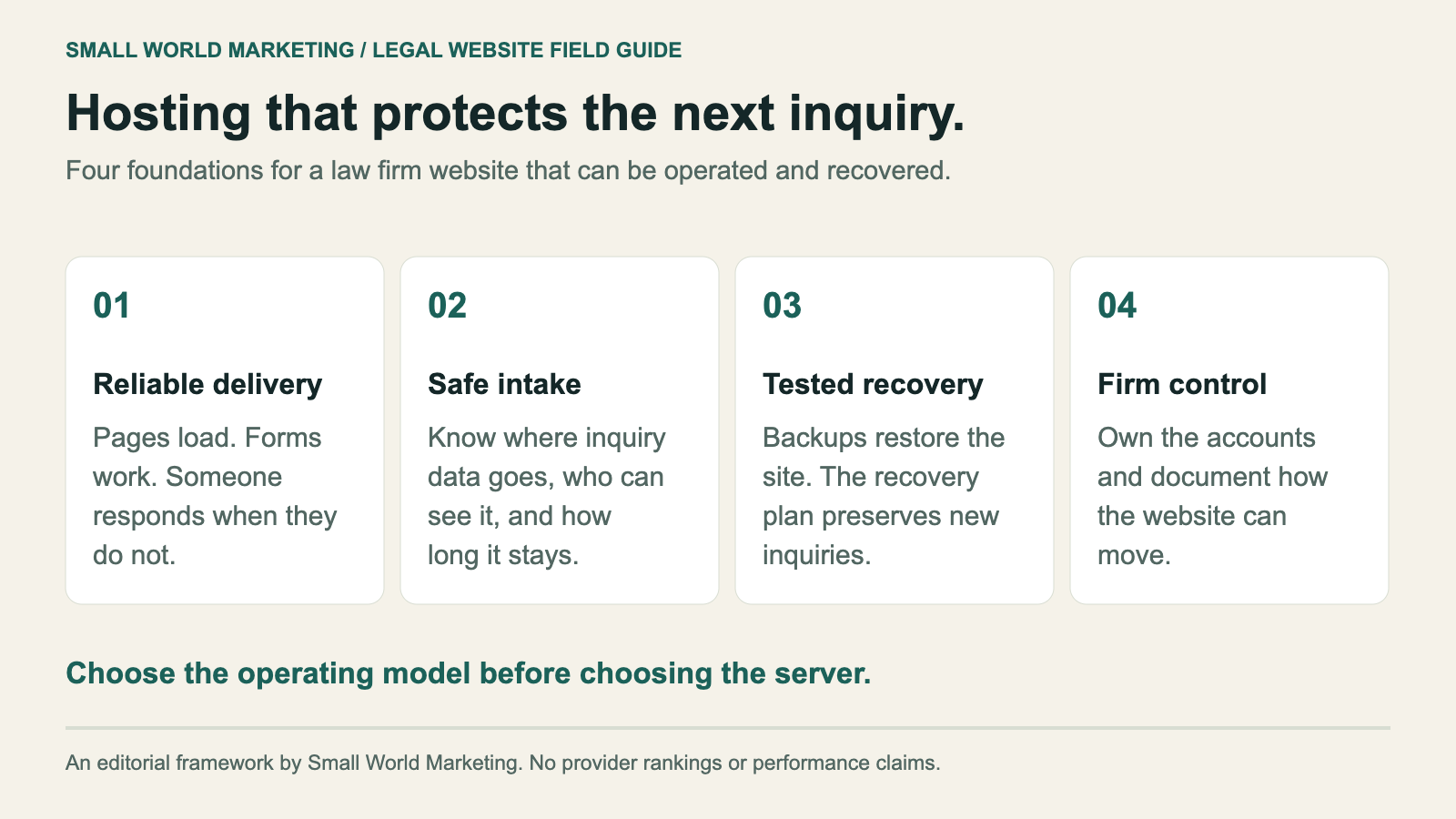
A law firm's website needs to do two jobs consistently: help prospective clients find the firm and make it easy to contact the right person. Hosting supports both. When the site stops loading, the contact form fails, or a provider change breaks important pages, the intake team feels it.
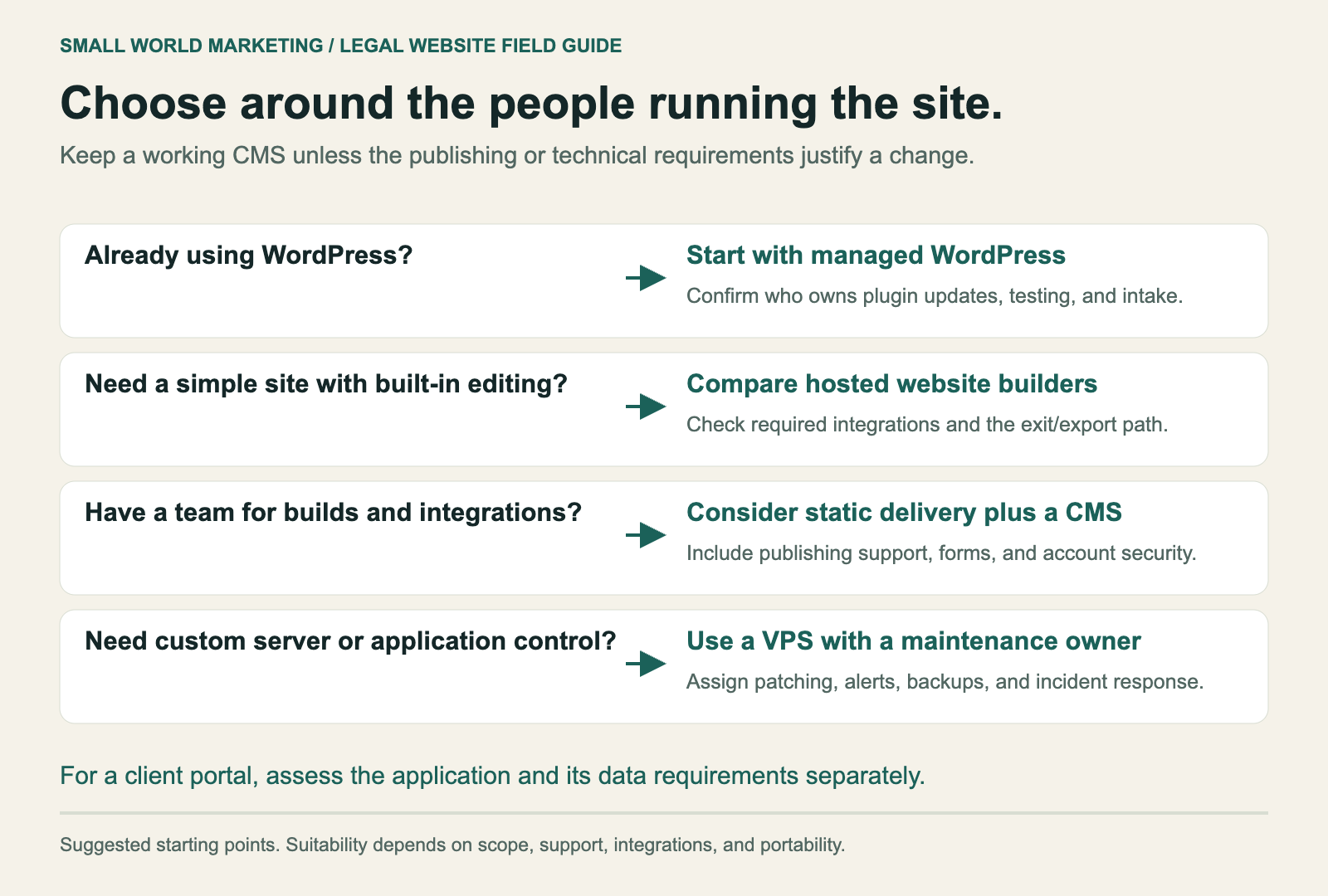
For most small and mid-sized Canadian law firms running WordPress, managed WordPress hosting with a named maintenance owner is the best starting point. Look for tested backups, staging, clear support coverage, and accounts the firm controls. A static website with an editing system can also work well when the team maintaining it can support that setup. An unmanaged server makes sense when someone has explicitly accepted responsibility for keeping it running.
The hosting decision should follow the firm's publishing workflow, intake process, and recovery requirements. Buying the largest server rarely fixes the whole problem.
This guide covers hosting options, Canadian data residency, performance, operating costs, account ownership, and the checks that protect search visibility during a move.
In this guide
- Which hosting setup fits a law firm?
- What to require from a hosting provider
- Canadian hosting and client information
- Speed, Core Web Vitals, and SEO
- The actual cost of operating the website
- Own the domain, accounts, and exit path
- How to change hosts without avoidable SEO damage
- What to monitor after launch
- Questions to ask before signing
- Frequently asked questions
Which hosting setup fits a law firm?
Start with who publishes content and who handles technical problems.
A family law firm adding lawyer bios, articles, and practice pages every month needs an editing workflow its staff can use. A boutique litigation firm with infrequent updates may be comfortable sending changes to a developer. A firm with a client portal needs someone to evaluate that application's requirements separately from the public marketing site.
The word 'cloud' describes infrastructure. It doesn't tell a firm who installs updates, responds to an outage, or restores a broken database. Ask about those jobs directly.
| Setup | Best fit | What still needs an owner | Main trade-off |
|---|---|---|---|
| Shared hosting | A simple site with modest traffic, adequate isolation, and a capable maintainer | CMS updates, forms, security, backups, and resource limits | Lower entry cost; performance and support vary by provider and plan |
| Managed WordPress | A firm that wants familiar editing and less server administration | Plugins, themes, content, intake integrations, and anything excluded from the plan | Less infrastructure work; management scope must be checked |
| VPS or cloud server with a maintenance agreement | A site with custom requirements and accountable technical support | Server patching, monitoring, application updates, and recovery | More control; more operational responsibility |
| Static website with a CMS | A content site supported by a team comfortable with builds and integrations | Publishing system, deployment pipeline, forms, dependencies, and account security | Can serve pages efficiently; editing and integrations need planning |
| Hosted website builder | A smaller site whose content and integration needs fit the platform | Content, account access, form delivery, and export planning | Simple operations; portability can be limited |
These are operating models, not a league table. A well-maintained shared environment can serve a small site effectively. An expensive cloud server can still deliver a poorly built site slowly.
WordPress or a static website?
WordPress is a practical default when nontechnical staff need to publish regularly. The firm should have a documented update process, limited administrator access, and a staging environment where changes can be checked before release.
Static delivery reduces the amount of application code running for each page request. It can work with a CMS that lets staff edit without using Git. The trade-off is responsibility for the publishing pipeline and connected services.
Neither approach removes the need to secure accounts and verify intake. A static page can load perfectly while its external contact form is broken. A WordPress dashboard can be fully updated while an abandoned plugin still introduces risk.
Keep a working CMS unless there is a concrete reason to replace it. Changing hosts, redesigning the site, rewriting content, and changing the domain in one release creates more moving parts to investigate if performance declines.
What to require from a hosting provider
A provider should be able to describe how the site is recovered and who answers when something breaks.
Use these requirements as a starting specification. Increase them where the website's role or the sensitivity of information warrants it.
| Requirement | Starting specification | Evidence to request |
|---|---|---|
| Availability | A published uptime commitment and independent monitoring | SLA, exclusions, monitoring history, and escalation process |
| HTTPS | Certificate setup and automatic renewal | Renewal owner and an expiry alert |
| Backups | Daily backups, a retention window that fits the firm, and protection from account compromise | Backup scope, storage location, retention, and restore-test results |
| Recovery | Agreed limits for acceptable data loss and recovery time | A timed restore exercise with pages and forms checked |
| Staging | A protected copy for testing updates | Demonstration of access controls and the release process |
| Maintenance | Named responsibility for server, CMS, theme, and plugin updates | Written scope and response targets |
| Support | Coverage that matches the firm's operating needs | Contact method, incident severity definitions, and escalation contact |
| Capacity | Clear limits and overage charges | Storage, traffic, CPU, database, and visitor limits where applicable |
| Ownership | Firm-controlled accounts or a documented access and export arrangement | Administrator access, export procedure, and exit terms |
Read an uptime commitment in minutes
99.9% availability permits about 43 minutes of downtime in a 30-day month. That figure is a calculation, not a prediction of the provider's performance.
| Availability | Downtime in a 30-day month | Downtime in a 365-day year |
|---|---|---|
| 99% | 7 hours 12 minutes | 87 hours 36 minutes |
| 99.9% | 43 minutes 12 seconds | 8 hours 45 minutes 36 seconds |
| 99.95% | 21 minutes 36 seconds | 4 hours 22 minutes 48 seconds |
| 99.99% | 4 minutes 19 seconds | 52 minutes 34 seconds |
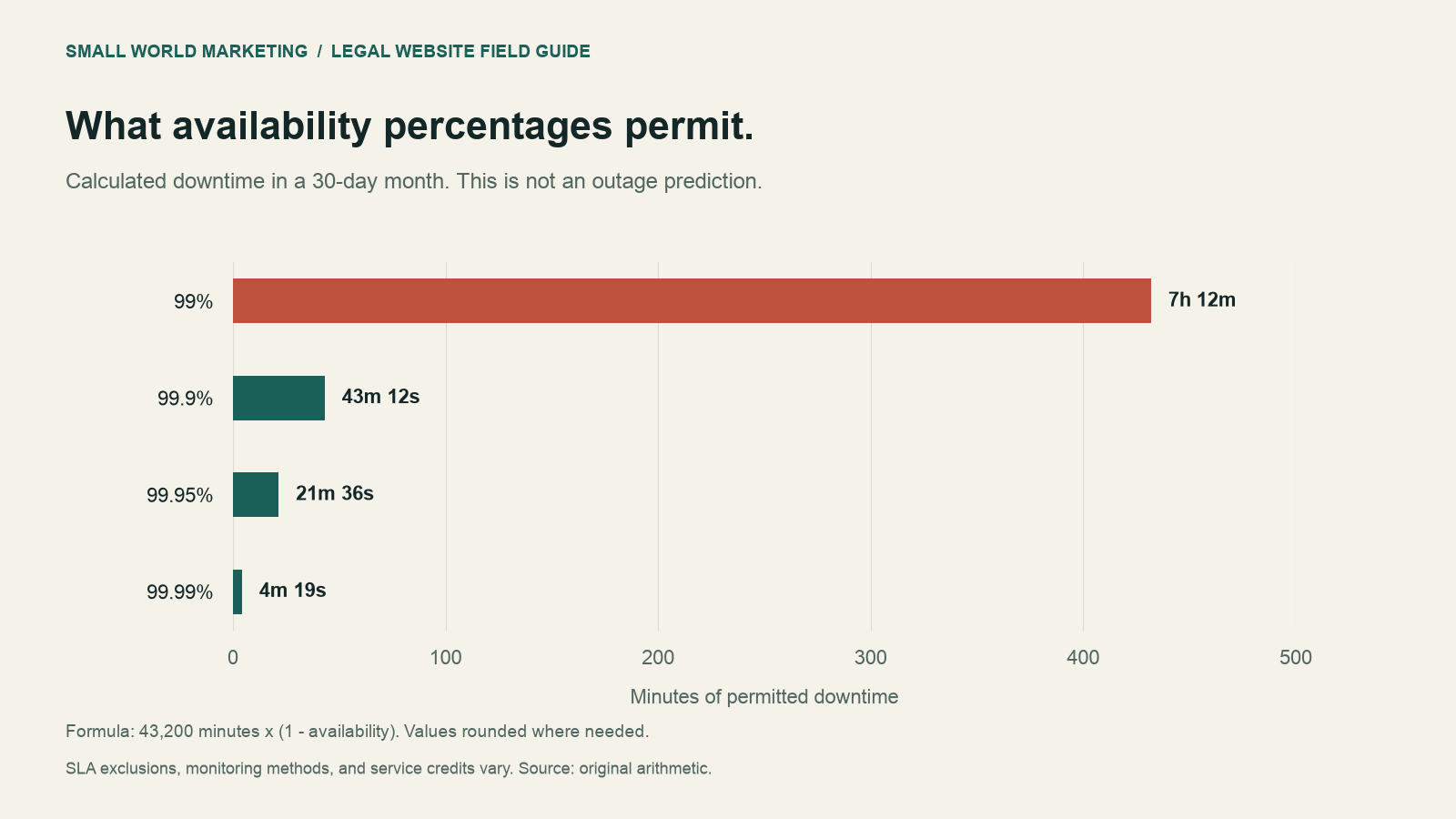
Calculation: minutes in the period multiplied by (1 - availability). Figures are rounded to the nearest second where needed. SLA exclusions, measurement methods, and service credits vary. Availability percentages do not describe actual outages or guarantee uninterrupted intake.
Monitor more than the homepage. A site can return a successful HTTP response while the form, scheduling tool, or phone link fails. Include a controlled intake test that uses fictional details and checks delivery to the intended recipient.
A backup is useful when it restores the right things
For a WordPress site, backing up files without the database leaves out much of the site. Backing up the database without uploaded files leaves another gap.
Ask the provider to restore a recent backup into a protected test environment. Check a practice page, a lawyer bio, an image, a downloadable file, and a form. Record how long the exercise takes.
Two recovery terms are worth understanding:
- Recovery point objective: how much recent data the firm can afford to lose. A daily backup can leave a gap approaching 24 hours if there is no more frequent recovery mechanism.
- Recovery time objective: how long the firm can afford to wait for service to return.
If inquiries are stored in a separate intake platform, its backup and retention arrangements need a separate review. A website restore won't recover a deleted CRM record.
Canadian hosting and client information
Choosing a Canadian server is one part of the decision. It doesn't establish where every connected service processes information.
A Toronto-hosted website might send inquiries to an external form service, an email provider, a CRM, and an automation tool. Its backups or support logs may use different locations again. Document the full path.
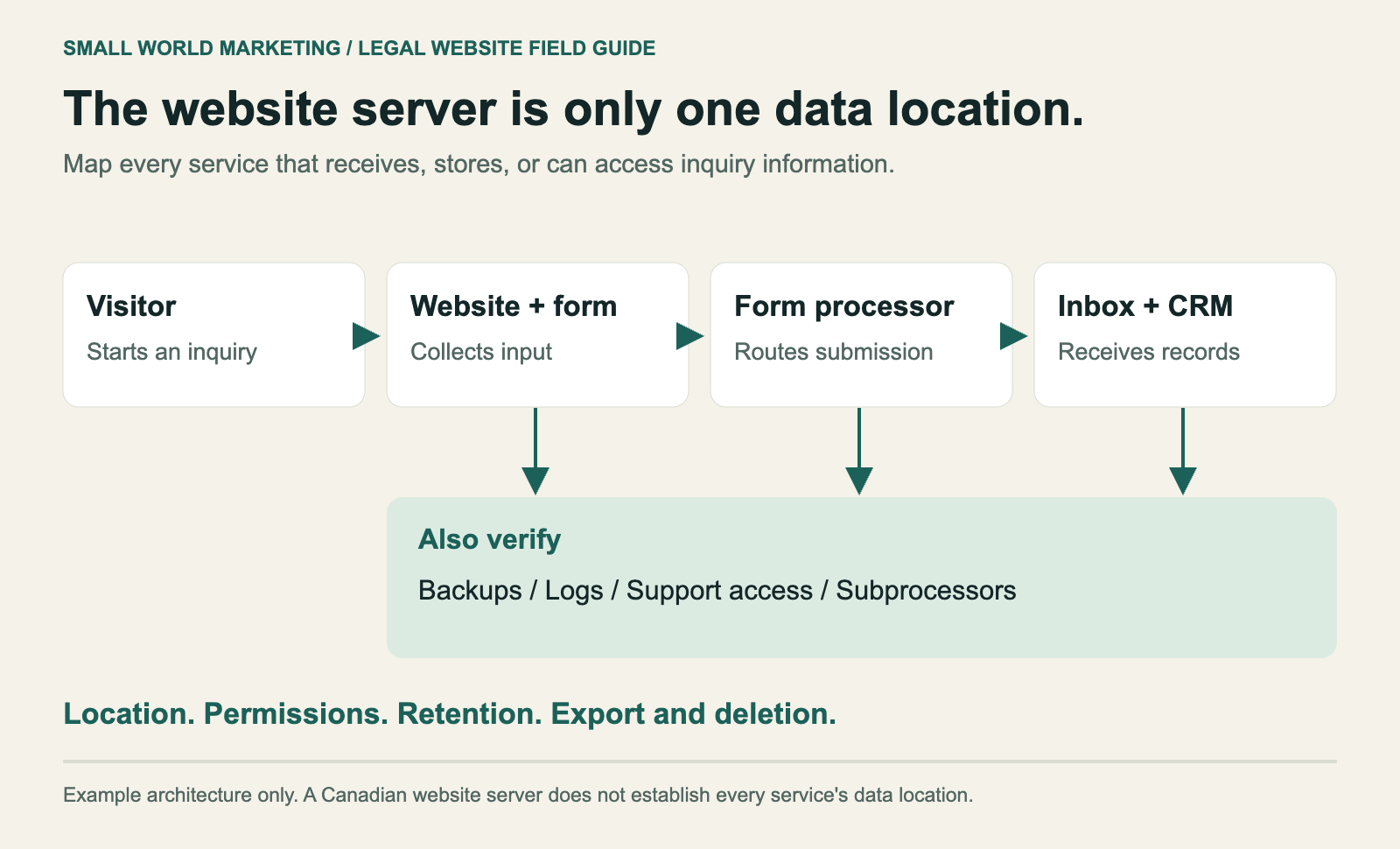
Example architecture only. Confirm the actual vendors, locations, access permissions, and retention settings used by the firm.
Under PIPEDA, cross-border processing is not automatically prohibited. The Office of the Privacy Commissioner explains that organizations remain accountable for outsourced information, must arrange comparable protection, and must be transparent about foreign processing. Provincial requirements and professional obligations need separate consideration. OPC guidance on cross-border processing.
The Law Society of British Columbia's cloud computing checklist gives firms a structured way to assess a provider and document due diligence. Use the current resources and rules for the firm's jurisdiction when evaluating the arrangement. Law Society of BC cloud computing checklist.
For a marketing website, the practical starting point is a data inventory:
| System | Information to look for | Question to resolve |
|---|---|---|
| Website and database | Contact submissions, user accounts, uploads | Is inquiry data stored here, and for how long? |
| Form processor | Names, contact details, free-text descriptions | Where is processing performed, and who can access submissions? |
| Email and CRM | Copies of inquiries and staff notes | Which accounts receive information, and what are their access rules? |
| Backups and logs | Copies of records, request details, error traces | Do logs or backups contain sensitive data, and where are they retained? |
| Analytics, chat, and session recording | URLs, interactions, recordings, and potentially typed content | Are form fields and sensitive pages excluded or masked? |
| Support and subprocessors | Access used to troubleshoot systems | Which parties can access data, under what terms? |
Keep the initial inquiry form short. Name, contact details, and a broad matter category may be enough to start a conversation. Detailed narratives, identity documents, and evidence deserve a purpose-built intake process with appropriate controls.
Also check what appears in notifications and analytics. Sending the entire form submission into an email subject line or an event parameter creates additional copies that are easy to overlook.
Speed, Core Web Vitals, and SEO
Hosting affects server response time and reliability. Page construction affects what happens after the server responds.
A large homepage video, uncompressed images, a heavy theme, or several third-party scripts can make a site slow on excellent infrastructure. Diagnose the bottleneck before buying a larger plan.
Google says Core Web Vitals are used by its ranking systems, but good scores alone don't guarantee high rankings. Content relevance and the wider search experience still matter. Google's Core Web Vitals guidance.
Measure the visitor experience
| Metric | What it measures | Google's 'good' threshold | What to investigate |
|---|---|---|---|
| Largest Contentful Paint, LCP | When the main visible content appears | 2.5 seconds or less | Server response, image loading, render-blocking resources |
| Interaction to Next Paint, INP | How quickly the page responds to interactions | 200 milliseconds or less | JavaScript work, chat widgets, third-party scripts |
| Cumulative Layout Shift, CLS | Unexpected movement of visible content | 0.1 or less | Image dimensions, fonts, banners, embedded tools |
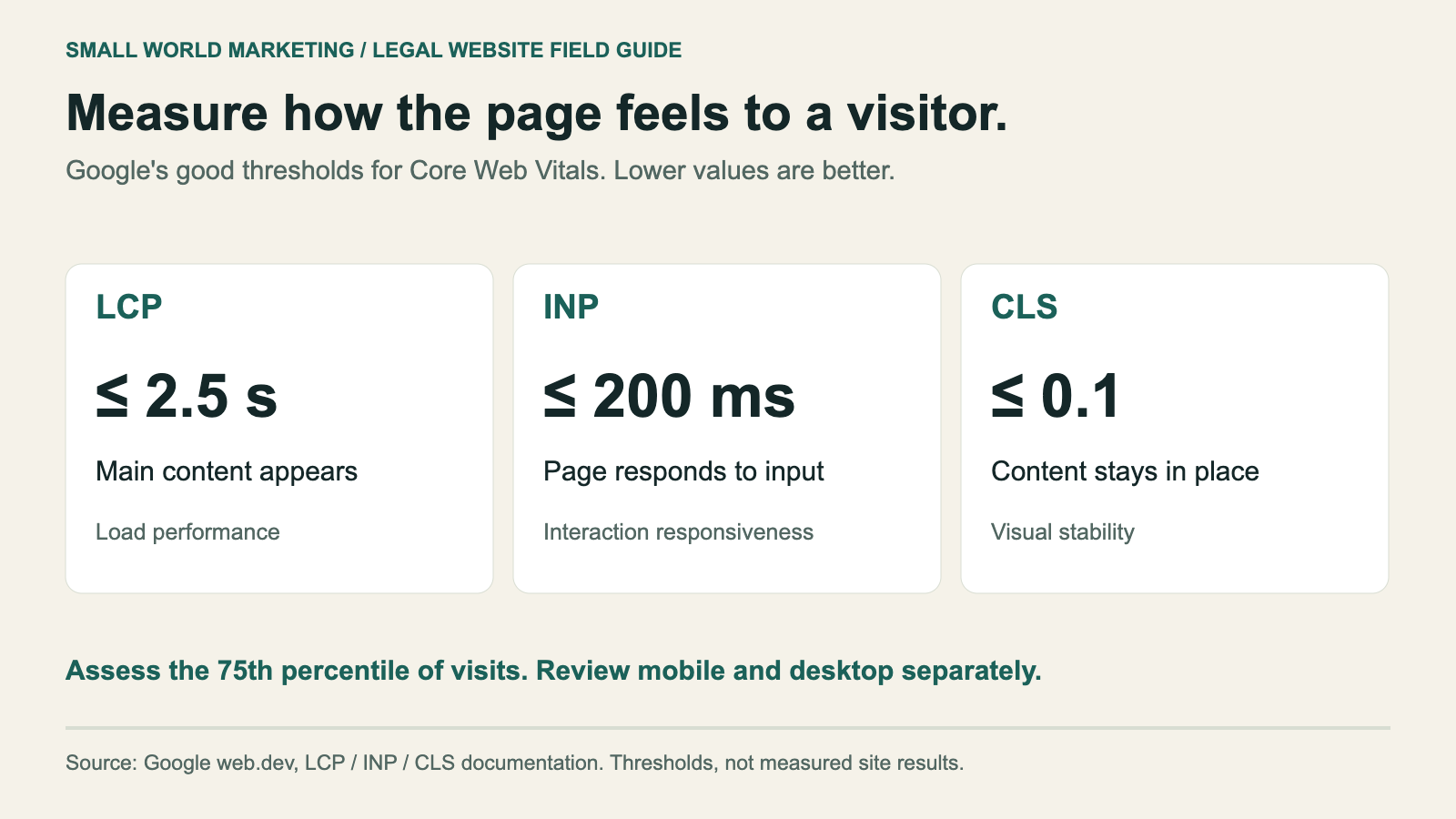
Thresholds are evaluated at the 75th percentile of visits, with mobile and desktop considered separately. Sources: Google's documentation for LCP, INP, and CLS. The illustration shows thresholds, not measurements of a particular website.
A Lighthouse performance score is a lab diagnostic. It isn't the same thing as real-user Core Web Vitals. PageSpeed Insights can show both when sufficient field data is available. A small firm may not have enough traffic for every page to receive a field-data assessment. Google's Web Vitals overview.
Test the pages that generate business: the homepage, important practice pages, location pages, lawyer bios, and contact page. Use a mobile connection and submit a test inquiry. A fast homepage doesn't establish that the rest of the site works well.
Check the server and the page separately
If server response is slow across lightweight pages, review caching, resource limits, database work, and distance to the serving location. If the response arrives promptly but the main content appears late, inspect images, fonts, scripts, and rendering.
Ask for an explanation tied to measurements. 'Upgrade to our premium plan' should come with evidence showing which limit the site is hitting and why the change will help.
The actual cost of operating the website
The hosting invoice is only one part of the budget. Maintenance, software licences, support, backups, and publishing work can cost more than the underlying infrastructure.
Request a total monthly cost and a separate one-time migration scope. Include renewal rates, currency, taxes, overages, and work excluded from support.
The following figures are a fictional CAD budgeting example, not provider prices or a market average.
| Example monthly item | Illustrative amount | What the quote should explain |
|---|---|---|
| Hosting infrastructure | CAD $60 | Plan limits, billing currency, and renewal rate |
| Website maintenance | CAD $70 | Updates, testing, and support tasks included |
| Software licences | CAD $20 | Who owns the licences and what happens on exit |
| Intake integration | CAD $25 | Form or routing service, usage limits, and data handling |
| Separate monitoring or backup service | CAD $15 | Whether this is needed or already included elsewhere |
| Total | CAD $190 per month | CAD $2,280 per year before tax and one-time work |
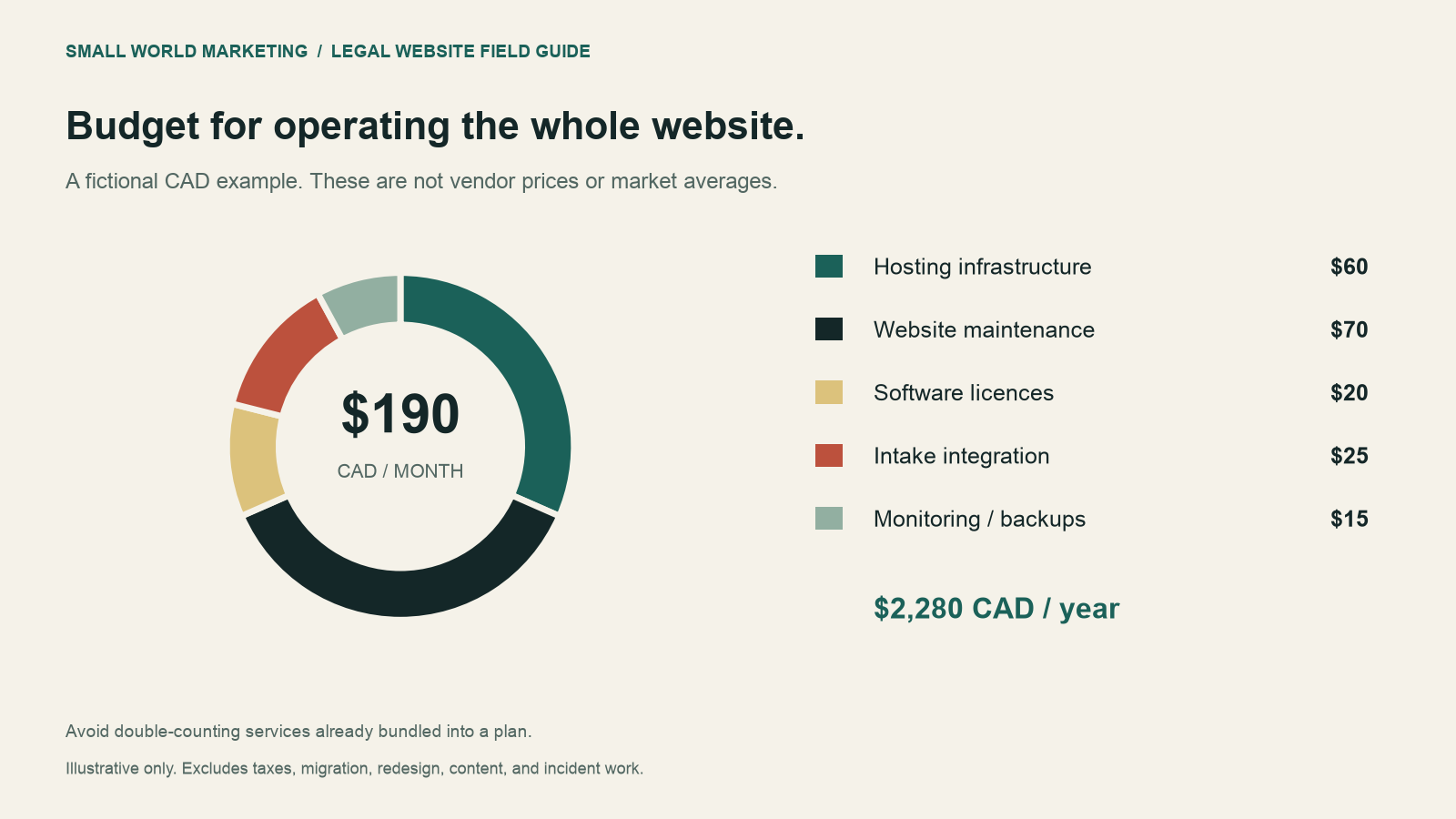
Illustrative amounts only. Components may be bundled into one plan; avoid counting them twice. Migration, redesign, content production, incident work, and taxes are excluded.
A firm should also understand the cost of leaving. A low monthly price can become expensive if exporting content requires a rebuild, licences disappear when the agency relationship ends, or nobody will provide the redirect configuration.
Own the domain, accounts, and exit path
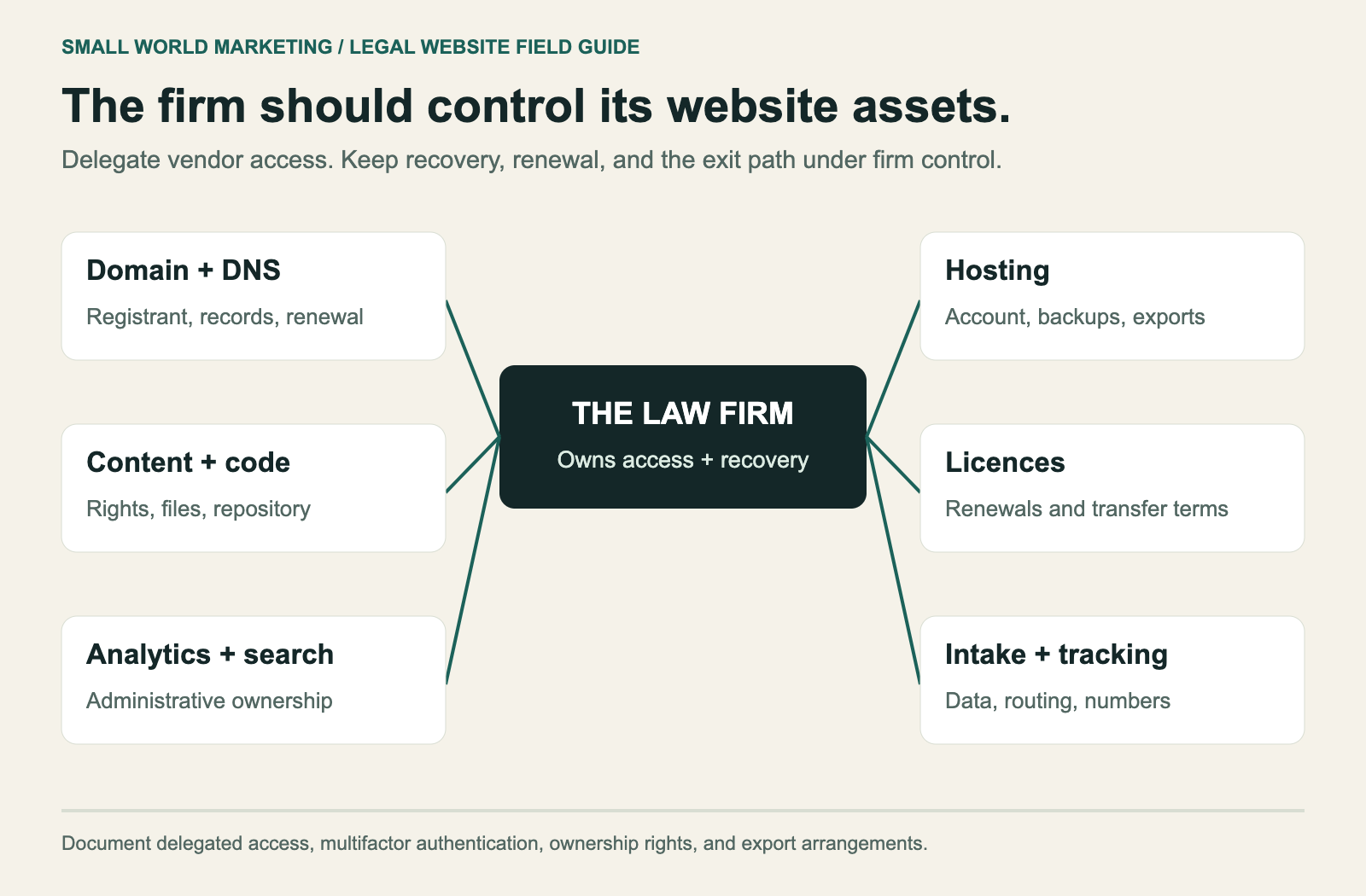
The domain is a business asset. Keep its registrant information, recovery email, and renewal process under the firm's control. Agency staff can have delegated access without becoming the only people who can manage it.
The same principle applies to DNS, hosting, analytics, Search Console, and intake tools. Use individual accounts, multifactor authentication, and a record of who can remove access.
| Asset | Firm should control | Exit requirement to document |
|---|---|---|
| Domain and DNS | Registrant details, billing, recovery, administrator access | Transfer process and complete DNS record export |
| Hosting | Account access or enforceable access and export rights | Full site export, backup access, and shutdown timing |
| Website content and code | Rights to content and clarity on code ownership | Files, database, media, repository access where relevant |
| Themes and plugins | Licence terms and renewal responsibility | What transfers and what needs replacement |
| Analytics and Search Console | Administrative ownership | Continued access to the same properties and historical data |
| Intake and tracking | Vendor accounts, routing configuration, permissions | Data export, tracking numbers, retention, and deletion process |
Confirm these arrangements before giving notice to an outgoing provider. A professional handover needs time to collect credentials, exports, and DNS records.
Changing website hosts does not automatically require transferring the domain registration or moving email. Those are separate services. Keeping them separate can make the transition easier to manage.
How to change hosts without avoidable SEO damage
First identify what is changing. A server move with identical URLs is different from a new CMS that changes page addresses. A new domain adds another layer.
| Move | Main checks | Search Console Change of Address? |
|---|---|---|
| New host, same domain and URLs | Site copy, HTTPS, DNS, intake, access, and monitoring | No |
| New CMS or URL structure on the same domain | URL inventory, page mapping, permanent redirects, internal links, canonicals | No |
| New domain or eligible subdomain move | Domain ownership, redirects, verification, and updated links | Yes, where Google's tool supports the move |
Google provides separate guidance for hosting changes without URL changes. Its Change of Address tool documentation explains which domain moves the tool supports. It isn't needed just because the hosting company changes.
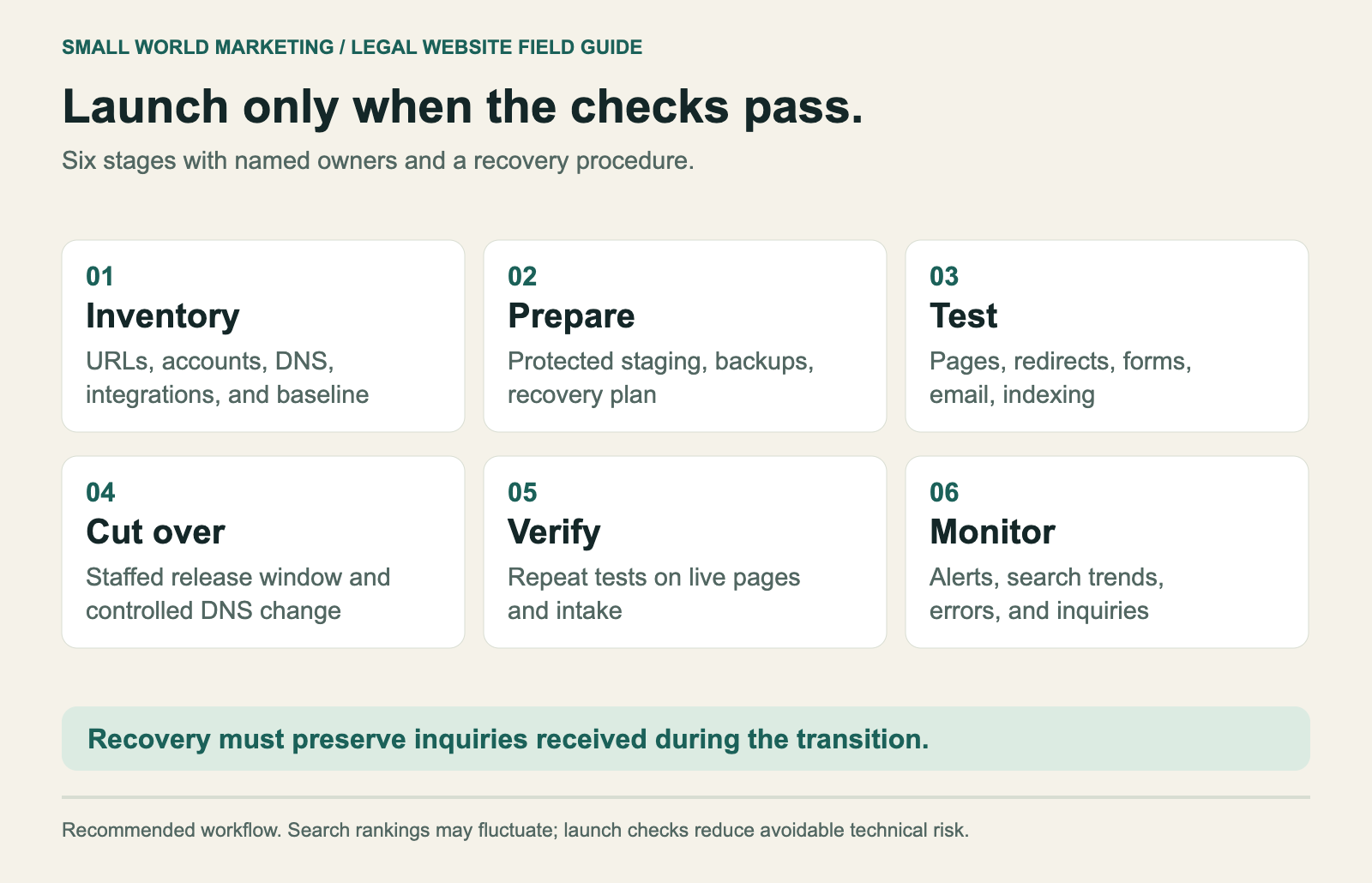
1. Inventory the current website and accounts
Capture page URLs, media, downloadable files, key integrations, administrator access, and the existing DNS zone. Identify the pages that receive organic inquiries, paid traffic, or important external links.
Export a performance baseline. Separate brand and non-brand search activity where possible. Record qualified inquiries as well as traffic so the firm can judge the business outcome after launch.
Check where the DNS service lives. Cancelling an old hosting account that also runs DNS can create an outage even if the new website is ready.
2. Prepare the new environment and the recovery plan
Create a protected staging copy and use fictional submissions for tests. Confirm HTTPS, permissions, backups, caching, and access for the people supporting the release.
Write down who approves launch, who can make DNS changes, and who responds to a failure. Specify what triggers a reversal and how new inquiries or database changes will be preserved if traffic returns to the old environment.
Restoring an old snapshot after the new site has received submissions can lose records. Recovery planning has to account for activity during the transition.
3. Decide what happens to each important URL
Keep page addresses stable where practical. For changed addresses, use a direct permanent redirect to the most relevant replacement. A genuinely removed page without a suitable replacement can return 404 or 410.
| Old address or content | Planned result | Verification |
|---|---|---|
/family-law/ retained |
Same address, successful page response | Correct content and canonical |
/divorce-lawyer/ moved to /family-law/divorce/ |
Direct 301 or 308 to the replacement | Correct destination loads successfully |
| Several overlapping articles consolidated | Redirect to the relevant combined resource | Destination satisfies the original topic |
| Obsolete page with no replacement | Appropriate 404 or 410 | Removed from navigation and sitemap |
| PDF still used by visitors | Preserve its address or redirect to the equivalent file | Download opens and links work |
Google recognizes 301 and 308 as permanent redirects. Google's redirect documentation.
Google also says permanent redirects don't inherently lose PageRank, warns against sending unrelated URLs to the homepage, and recommends keeping migration redirects for at least a year. Significant site changes can cause temporary ranking fluctuations. A fixed 'percentage of rankings preserved' isn't a useful guarantee. Google's site-move guidance.
4. Test intake, email, and launch settings
Have someone outside the build team work through a prospective client's path on mobile. Open a practice page, read a bio, tap the phone number, and submit a controlled inquiry. Check the recipient's inbox and CRM.
Website DNS changes should preserve unrelated records unless their services are intentionally moving. That includes MX records for email and TXT records used for SPF, DKIM, DMARC, and ownership verification. Confirm the complete zone when changing nameservers.
The release should have explicit pass/fail conditions:
- Important pages and files load at their intended addresses.
- Changed URLs reach the planned destinations without loops.
- Public pages have the intended indexing settings and canonical URLs.
- Contact forms deliver correctly, including error handling and notifications.
- Phone links, scheduling tools, and tracking behave as intended.
- HTTPS works and certificate renewal has an owner.
- Email still sends and receives through the intended service.
- A usable backup and recovery procedure are available.
5. Cut over and verify the live site
Choose a time when traffic is lower and the people supporting launch are available. If reducing DNS cache duration in advance is part of the plan, allow existing records time to expire before cutover.
Check the live site from more than one network. Repeat intake tests. Inspect public indexing settings, links, and tracking on the production environment. Staging tests don't establish that live routing and credentials are correct.
Keep the old environment available while confirming the transition. Google's hosting-move guidance recommends checking traffic and server logs before shutting down the old infrastructure. Google's hosting-change checklist.
What to monitor after launch
Use immediate alerts for technical failures and a longer window for search trends. Search Console reporting and field performance data aren't instant outage monitors.
The schedule below is a recommended operating cadence. Adjust it for the site's size and the scope of the move.
| Period | Check | Action when something is wrong |
|---|---|---|
| Launch and first 48 hours | Availability, HTTPS, forms, email, errors, and key pages | Treat broken intake or widespread failures as incidents |
| First week | Redirect results, crawling, sitemap processing, tracking, and qualified inquiries | Fix technical errors and distinguish tracking failures from traffic loss |
| Weeks 2 to 4 | Search clicks, landing pages, indexing, inquiries, and template performance | Compare with the baseline and investigate affected page groups |
| Following months | Search recovery, field performance where available, and unresolved issues | Continue review until migration issues are understood and addressed |
Compare equivalent weekdays and account for holidays, campaigns, and seasonal demand. A drop in analytics sessions alongside stable Search Console clicks may point to a tracking problem. A drop isolated to moved practice pages warrants a different investigation.
Prioritize issues that block clients or search engines. A broken contact form requires immediate action. A small change in one keyword's position doesn't, by itself, justify reversing a migration.
For personal injury firms and any practice with valuable organic inquiries, use the firm's own lead and intake data to estimate exposure. Traffic, qualification rate, signed matters, fee arrangements, and timing all matter. Don't multiply lost visitors by an assumed case value and present the result as revenue lost.
Questions to ask before signing
Send the same questions to every provider so the answers can be compared:
- What exactly is included in 'managed', and who handles excluded tasks?
- Who responds when the site or a contact form fails outside office hours?
- Which limits can trigger an upgrade or overage charge?
- Where are the site, inquiry records, backups, and logs stored or processed?
- Can the firm review a successful restore test?
- What recovery time and potential data loss should the firm plan for?
- Who controls the domain, DNS, website, licences, and analytics accounts?
- Does migration include SEO checks and intake testing, or only copying files?
- What is the process and cost for exporting the site and leaving?
- What happens to redirects, DNS, and stored records after cancellation?
Download the hosting provider comparison checklist and migration launch checklist to record answers and assign owners.
Frequently asked questions
What is the best hosting for a small law firm?
For a typical WordPress marketing site, start with managed WordPress hosting and a clearly scoped maintenance agreement. Compare support, restoration, limits, account control, and integration needs. A firm with a different publishing workflow may be better served by a hosted builder or a static site with a CMS.
Does a Canadian law firm have to host its website in Canada?
There isn't one blanket answer covering every firm, jurisdiction, and data flow. PIPEDA doesn't automatically prohibit foreign processing, but accountability and safeguards remain. Assess applicable provincial requirements, professional obligations, contracts, and the actual tools receiving information. A Canadian website server alone doesn't settle the question.
Will better hosting improve Google rankings?
Better hosting can address slow responses, outages, and resource limits. It doesn't guarantee a ranking improvement or fix weak content, poor navigation, or heavy scripts. Diagnose the site, improve the measured bottleneck, and track search performance alongside qualified inquiries.
Can a law firm change hosts without changing its domain?
Yes. The domain registration, website hosting, DNS, and email are separate services. A host change can keep the same domain and URLs. Preserve email and verification records, test the new site, and verify the live transition before cancelling old services.
Is a free migration enough?
Only if its scope covers what the firm needs. A file-and-database copy may exclude redirects, analytics, intake integrations, DNS review, and launch monitoring. Ask for the included tasks and acceptance criteria in writing.
Are static websites secure?
Static delivery removes some risks associated with an application executing on each page request. The CMS, deployment pipeline, accounts, scripts, and form services still need protection. Evaluate the complete setup and who maintains it.
How long should a website migration take?
A straightforward copy with stable URLs needs less preparation than a rebuild or domain change. Inventory the site and integrations before setting a deadline. Allow time for testing and handover, then continue monitoring after launch. Search processing follows its own timeline.
Should the website collect detailed case information?
Keep initial contact limited to information needed to route the inquiry. Use an appropriate intake process for documents and detailed matter information. Review storage, access, retention, and notifications across every service involved.
Planning a hosting change?
Start with a clear picture of the current site: who controls the accounts, which pages bring inquiries, where contact details are sent, and how the website would be recovered.
Small World Marketing works with law firms on search visibility and website strategy. Bring the current website, hosting arrangement, and proposed move to the conversation so the technical work can be tied to the firm's intake process.
Talk to Small World Marketing about the website.
Related law firm website resources
Compare the hosting and care service, use the website migration checklist, and assess a rebuild with the law firm website design guide. The website cost guide separates the build from ongoing care.