A redesign should solve a documented problem. Before replacing a site, identify which pages bring inquiries, what prevents prospective clients from contacting the firm, and which technical problems can be fixed without rebuilding.
The word "redesign" can describe several different projects. One firm may need clearer service pages and a repaired contact form. Another may need a new content model because every edit breaks the layout. A third may be changing domains, URLs, hosting, forms and analytics at once. Those projects have different risks, costs and acceptance tests.
Start with evidence. Record what works, what fails, who owns each system and what must remain true after launch. A new visual direction can be part of the work, but appearance alone is not a useful completion standard.
Diagnose the problem before choosing the project
Create a baseline before a designer or developer starts changing pages. The baseline should cover the website, the inquiry path and the systems around them.
For the public site, inventory the URLs that receive meaningful visits, impressions, links or inquiries. Record their current title, purpose, status code, canonical, indexability and internal links. Review the navigation and the path from a practice-area page to a lawyer profile or contact option. A crawl is useful, but it will not tell the firm whether a page answers the right client question.
For intake, run permitted tests through every public contact route. Use labelled synthetic details, not a real prospective client's personal information. Confirm what the visitor sees, where the submission goes, whether notifications arrive, whether spam controls behave as expected and who is responsible for follow-up. Check phone links and booking links on a real mobile viewport.
For content, ask the responsible lawyer or editor to identify pages that are accurate, pages that need substantive review and pages that should not be carried forward. An old URL with useful links or search visibility may still need rewriting, but deleting it without a destination can discard value and leave visitors at an error page.
The law firm website design service explains how page requirements, editing, ownership and intake testing fit together. If the main problem is limited to hosting or a platform move, use the law firm website migration guide before treating it as a full redesign.
| Baseline area | Evidence to capture | A problem it can reveal | Owner before work starts |
|---|---|---|---|
| Public URL inventory | URL, purpose, status, canonical, indexability and internal links | Valuable pages are omitted or duplicate pages compete for the same task | Content and SEO owner |
| Search and referral entry pages | Search Console and analytics exports for a defined comparison period | A proposed navigation change hides pages people already use | Marketing owner |
| Inquiry path | Labelled test submission, notification and follow-up record | A working page sends inquiries to an unmonitored destination | Intake owner |
| Editing workflow | A real draft-to-approval exercise | Routine updates require a developer or bypass lawyer review | Editorial owner |
| Accounts and vendors | Domain, DNS, hosting, repository, analytics, forms and licence register | The firm cannot approve access or leave the supplier | Firm administrator |
| Performance and accessibility | Field data where available, lab checks and knowledgeable manual review | A fast template still has keyboard, label or reading-order failures | Technical and accessibility reviewers |
| Privacy and data flow | Form fields, recipients, processors, retention and deletion path | New chat, analytics or intake tools create an unreviewed data flow | Privacy lead |
Do not turn the baseline into a made-up score. A failed intake notification may matter more than twenty cosmetic inconsistencies. Rank findings by client impact, business risk, frequency and the effort needed to verify a fix.
Separate visual preferences from operating failures
A dated colour palette is a preference. A contact button that disappears at phone width is an operating failure. Both can justify work, but they should not be described as the same problem.
Write each finding in a testable form:
- Name the affected page or component.
- Record the observation and how it was reproduced.
- Describe the client or staff task affected.
- Assign an owner.
- Define what evidence will show the problem is resolved.
For example, "the site feels old" does not define a project. "At 390 pixels, the practice-page contact control overlaps the footer and cannot be activated with the keyboard" identifies a condition that can be tested again. "Editors cannot add a lawyer bio without changing source code" identifies a workflow limitation.
Performance deserves the same discipline. Google's current Core Web Vitals describe loading, interaction and visual stability using Largest Contentful Paint, Interaction to Next Paint and Cumulative Layout Shift. The published good thresholds are LCP within 2.5 seconds, INP at 200 milliseconds or less and CLS at 0.1 or less, measured at the 75th percentile and separated by mobile and desktop. These are field measures, not a promise that every individual visit will match the threshold. Lab tools can catch regressions before launch, but a simulated test cannot replace real-user field data.
Accessibility checks also need more than an automated score. W3C recommends evaluating accessibility early and throughout a redesign and states that no tool alone can determine whether a site meets accessibility standards. Include keyboard use, visible focus, headings, form labels, error handling, zoom, reflow and screen-reader review appropriate to the project's requirements. Applicable standards and legal obligations need qualified review for the firm and jurisdiction.
Compare repair, phased replacement and full rebuild
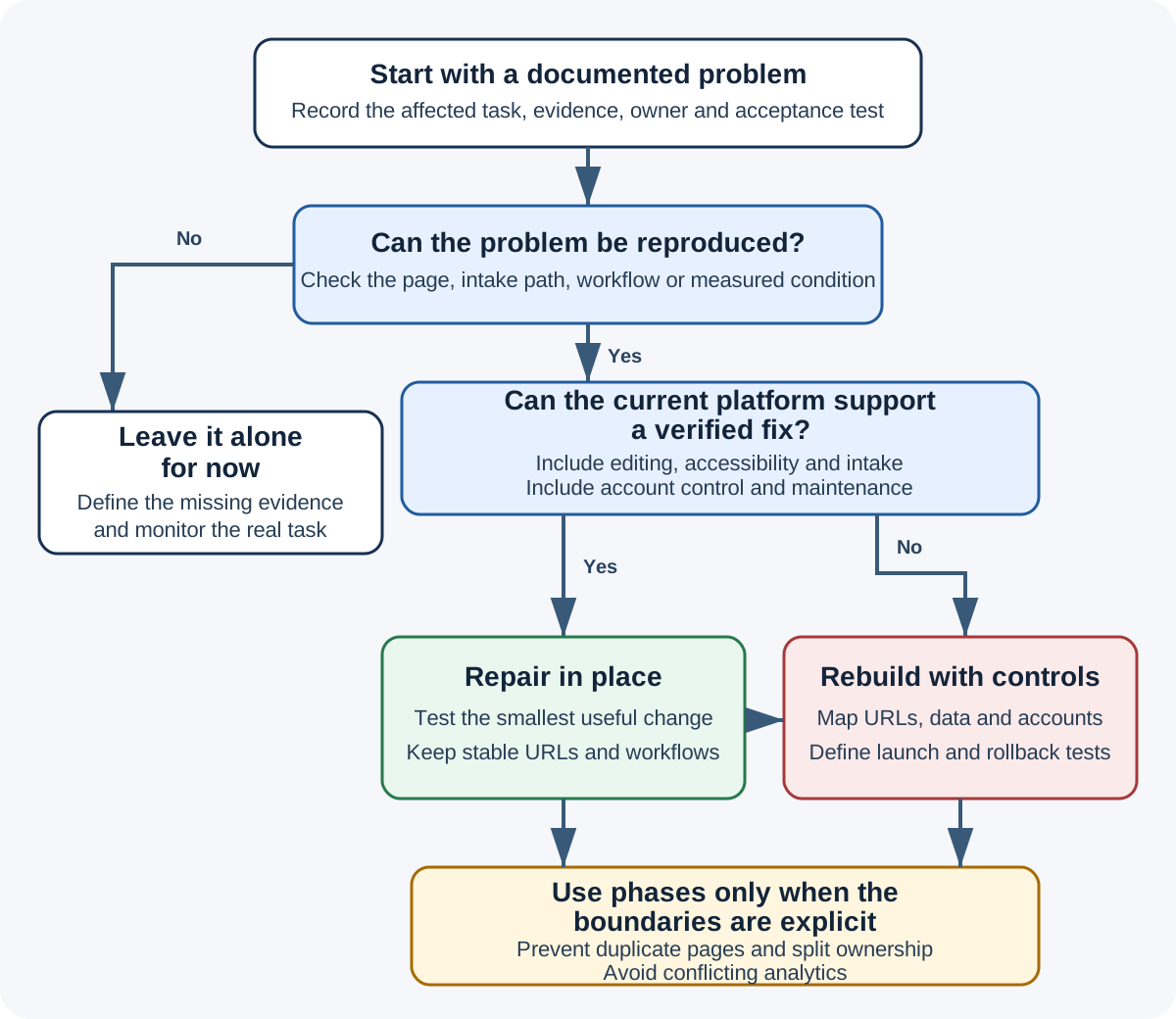
There are three practical paths.
Repair the existing site when the underlying platform and content model can support the required changes. Repair can include navigation, templates, forms, performance work, accessibility remediation, content editing and removal of unused scripts. It often reduces migration risk because URLs, accounts and publishing workflows can stay in place.
Replace in phases when one section or system is failing but the whole site does not need to move at once. A firm might rebuild lawyer profiles and practice pages in the existing platform, then change hosting later. Phasing needs clear boundaries so two systems do not create duplicate pages, broken navigation or competing analytics.
Rebuild the site when the current platform cannot support essential requirements, the content model prevents safe editing, the code cannot be maintained, account control cannot be corrected within the current arrangement, or the required information architecture is fundamentally different. A rebuild is not automatically better. It creates migration, testing and handover work that a repair may avoid.
| Observed condition | Repair is usually worth testing | A rebuild may be justified when | Evidence needed for the decision |
|---|---|---|---|
| Visual inconsistency | Shared styles and components can be corrected without replacing content | Templates cannot be changed safely or consistently | Component inventory and a repaired prototype |
| Slow pages | Images, fonts, scripts, caching or rendering can be improved in place | The platform prevents removal of the measured bottleneck | Field data, lab traces and a before-and-after test |
| Broken intake | Form configuration, delivery and follow-up can be repaired | Required workflow or security controls cannot be supported | End-to-end synthetic submission record |
| Editing difficulty | Fields, permissions and previews can be improved | Routine approved content requires code changes across many templates | Observed editorial task and role map |
| Accessibility failures | Components and content can be remediated | Core widgets or authoring output cannot meet requirements | Manual findings, tool results and component retest |
| Content overlap | Pages can be consolidated with redirects and internal-link changes | The information architecture cannot represent distinct client tasks | URL and intent inventory |
| Vendor control | Accounts and access can be transferred | The firm cannot obtain necessary data, source or administrative control | Written account, asset and export register |
| Unsupported technology | Dependencies can be upgraded without changing the public structure | Critical software is abandoned or incompatible with required controls | Dependency inventory and maintainability assessment |
Ask for a repair estimate and a rebuild estimate against the same requirements. A lower project fee is not a saving if it excludes URL mapping, content migration, form testing, accessibility work, analytics, training or post-launch support. The law firm website cost guide provides a scope worksheet for comparing those exclusions.
Preserve useful pages, URLs and evidence
A redesign does not require every URL to change. If a useful page keeps the same purpose, preserving its URL can remove an entire class of migration work.
When URLs must change, create an old-to-new map before launch. Give every material current URL one reviewed outcome: keep it, move it to a relevant replacement, consolidate it into a genuinely equivalent page, or intentionally retire it with an appropriate response. Do not redirect unrelated pages to the homepage simply to avoid errors.
Google Search Central's current site-move guidance recommends preparing and testing the new site, mapping old URLs to their corresponding new format, using server-side permanent redirects where possible, updating internal links and canonicals, and submitting the new sitemap. It also advises redirecting to the final destination rather than creating chains and generally keeping redirects for at least one year. The firm may choose to keep useful redirects longer for visitors and external links.
Preserve more than URLs. Keep the evidence needed to explain what happened:
- a pre-launch crawl and content inventory;
- exported analytics and Search Console comparisons with dates;
- the approved redirect map;
- current DNS and email-related records;
- form destinations and notification owners;
- structured-data requirements;
- media rights and original files;
- consented testimonials and review sources;
- tracking and campaign destinations;
- legal and editorial approvals; and
- the rollback package.
If the domain changes, the project needs additional domain-level planning. If only the design changes and URLs remain stable, do not manufacture a domain migration.
Control accounts, data and third-party changes
A redesign often changes hosting, forms, analytics, chat, appointment tools, consent tools, fonts, media and developer access. Record the account owner, administrator, billing owner, data handled, renewal date and offboarding step for each service.
The Office of the Privacy Commissioner of Canada's September 2026 guidance on assessing third-party service providers says organizations subject to PIPEDA remain responsible for personal information under their control, including information handled on their behalf by a provider. It recommends mapping data flows, identifying subprocessors and locations, confirming roles, assessing security and planning for retention, deletion and vendor exit. The guidance was open for comment until December 4, 2026 when this article was reviewed, so check the current version before relying on it.
The redesign team should not decide legal applicability or approve the firm's privacy practices. The practical job is to make the data flow visible so the firm's lawyer or privacy lead can review actual tools, terms, form fields, notices, safeguards and retention.
Keep live prospective-client information out of design tickets, demo databases and screenshots. Use synthetic records for permitted tests, restrict access, and remove test data according to the approved process.
Define launch acceptance before development ends
Launch should be the execution of an approved checklist, not the first time the team discovers how the site behaves.
Agree on a content freeze or reconciliation process. If staff continue editing the old site while the new one is being prepared, record how those changes will reach the launch version. Identify the decision maker who can delay launch, the conditions that require rollback and the people who can change DNS, hosting and application settings.
Test the final production-like environment. A staging site may use different domains, email controls, security headers, caching and integrations. Repeat critical tests after the public release.
| Acceptance area | Pre-launch evidence | Immediate live check | Owner and response |
|---|---|---|---|
| Pages and navigation | Approved inventory, headings and internal links | Priority pages return the intended status and navigation works at phone and desktop widths | Content owner fixes or rolls back affected release |
| Search controls | Canonicals, robots directives, sitemap and structured data reviewed | Public pages are indexable as intended and sitemap lists final URLs | SEO owner records and corrects discrepancy |
| Redirects | Old-to-new map tested in staging or equivalent ruleset | Sample every redirect class, important URLs and known external destinations | Technical owner repairs direct destination |
| Intake | Synthetic submissions reach the expected recipients | Repeat each allowed contact path and record timestamps | Intake owner confirms receipt and follow-up |
| Accessibility | Automated and knowledgeable manual findings resolved or documented | Keyboard, focus, reflow, labels and errors checked on representative pages | Accessibility owner logs and prioritizes issues |
| Performance | Lab baseline and field-data plan agreed | Check for deployment regressions and start field-data observation | Technical owner investigates material regression |
| Analytics | Events, consent behaviour and referral rules documented | Real-time or debug observation confirms approved events without using client data | Analytics and privacy owners reconcile results |
| Security and privacy | Access, vendors, data flows, retention and incident contacts approved | Remove unnecessary launch access and confirm public notices and forms | Firm administrator and privacy lead |
| Recovery | Backup, deployment version and rollback decision tested | Confirm the known-good version and people authorized to restore it | Technical owner initiates documented recovery |
Download the law firm website redesign acceptance worksheet. It is a blank working record, not a completed audit or compliance checklist.
Measure the result against the original problem
Review the redesign against its documented purpose. Do not declare success because the site launched on time or because a lab score improved.
Use a defined comparison period and annotate the launch date. Check that priority pages remain available, intended redirects continue to work, search systems can access the final URLs, and inquiry routes still reach the right people. Compare relevant inquiries and page tasks, not only total sessions. Seasonality, campaigns, brand demand and other business changes can affect the same numbers, so record those limits.
Some improvements can be verified immediately. A broken mobile control either works or it does not. Editing access can be tested with an approved content change. Redirects, canonicals and form delivery can be checked directly. Search visibility and field performance need observation over time.
Schedule post-launch reviews with explicit owners:
- Immediately after release: priority pages, redirects, robots, canonical, sitemap, forms, phone links, analytics and access.
- After the first operating days: error logs, intake records, staff editing, mobile behaviour and unplanned content differences.
- After enough field data exists: Core Web Vitals, search entry pages, relevant queries and qualified inquiry patterns.
- Before support or warranty periods end: unresolved defects, training, documentation, source files, exports and offboarding readiness.
The redesign is complete when the firm can operate the site, verify the client path and leave the project with the promised assets and access. The web designer selection guide can help turn these acceptance requirements into proposal questions. For project scoping or an independent review, contact Small World Marketing.
Sources and limits
This guide was reviewed on October 28, 2026 against:
- Google Search Central guidance for site moves with URL changes;
- Google's current Web Vitals overview;
- W3C Web Accessibility Initiative evaluation guidance; and
- Office of the Privacy Commissioner of Canada guidance on assessing third-party service providers.
Platform interfaces, measurement definitions and guidance can change. This article does not report a completed audit, guarantee search or inquiry results, establish a universal redesign budget, or provide legal advice. The firm's responsible lawyers, privacy lead, accessibility reviewer and technical owners should approve requirements within their roles.